Calico Advertise IPPool Using BGP
Overview
This lab demonstrates how to advertise Calico IP pools to external networks using BGP. You will learn how to configure BGP peering between Calico nodes and an upstream router to make pod IP addresses routable outside the Kubernetes cluster.
Lab Setup
To setup the lab for this module Lab setup
The lab folder is - /containerlab/10-calico-bgp-ippool
Manifest Files
ContainerLab
| File | Description |
|---|---|
| topology.clab.yaml | ContainerLab topology with Arista switch and Kind cluster across two VLANs |
Kind Cluster
| File | Description |
|---|---|
| k01-no-cni.yaml | Kind cluster configuration without CNI |
Calico CNI
| File | Description |
|---|---|
| calico-cni-config/custom-resources.yaml | Custom Calico Installation resource with IPAM configuration |
| calico-cni-config/bgpconfiguration-lb.yaml | BGP Configuration with LoadBalancer advertisement |
| calico-cni-config/bgpconfiguration-no-lb.yaml | BGP Configuration without LoadBalancer advertisement |
| calico-cni-config/bgppeer-vlan-10.yaml | BGP Peer resource for VLAN 10 nodes |
| calico-cni-config/bgppeer-vlan-20.yaml | BGP Peer resource for VLAN 20 nodes |
Kubernetes Manifests
| File | Description |
|---|---|
| k8s-manifests/lb-ippool.yaml | LoadBalancer IP pool definition |
| k8s-manifests/lb-nginx-service.yaml | LoadBalancer type service for nginx |
Tools
| File | Description |
|---|---|
| tools/multitool-1.yaml | First multitool DaemonSet |
| tools/multitool-2.yaml | Second multitool DaemonSet |
| tools/nginx-deployment.yaml | Nginx deployment manifest |
Startup Configs
| File | Description |
|---|---|
| startup-configs/ceos01-startup-config.config | Arista cEOS switch startup configuration |
Lab Exercises
NoteThe outputs in this section will be different in your lab. When running the commands given in this section, make sure you replace IP addresses, interface names, and node names as per your lab.
1. Inspect ContainerLab Topology
First, let's inspect the lab topology.
containerlab inspect topology.clab.yaml
16:05:41 INFO Parsing & checking topology file=topology.clab.yaml
╭───────────────────────────┬──────────────────┬─────────┬───────────────────────╮
│            Name           │   Kind/Image     │  State  │     IPv4/6 Address    │
├───────────────────────────┼──────────────────┼─────────┼───────────────────────┤
│ k01-control-plane         │ ext-container    │ running │ 172.18.0.4            │
│                           │ kindest/node     │         │ fc00:f853:ccd:e793::4 │
├───────────────────────────┼──────────────────┼─────────┼───────────────────────┤
│ k01-worker                │ ext-container    │ running │ 172.18.0.5            │
│                           │ kindest/node     │         │ fc00:f853:ccd:e793::5 │
├───────────────────────────┼──────────────────┼─────────┼───────────────────────┤
│ k01-worker2               │ ext-container    │ running │ 172.18.0.2            │
│                           │ kindest/node     │         │ fc00:f853:ccd:e793::2 │
├───────────────────────────┼──────────────────┼─────────┼───────────────────────┤
│ k01-worker3               │ ext-container    │ running │ 172.18.0.3            │
│                           │ kindest/node     │         │ fc00:f853:ccd:e793::3 │
├───────────────────────────┼──────────────────┼─────────┼───────────────────────┤
│ clab-calico-bgp-lb-ceos01 │ arista_ceos      │ running │ 172.20.20.2           │
│                           │ ceos:4.34.0F     │         │ 3fff:172:20:20::2     │
├───────────────────────────┼──────────────────┼─────────┼───────────────────────┤
│ k01-control-plane         │ k8s-kind         │ running │ 172.18.0.4            │
│                           │ kindest/node     │         │ fc00:f853:ccd:e793::4 │
├───────────────────────────┼──────────────────┼─────────┼───────────────────────┤
│ k01-worker                │ k8s-kind         │ running │ 172.18.0.5            │
│                           │ kindest/node     │         │ fc00:f853:ccd:e793::5 │
├───────────────────────────┼──────────────────┼─────────┼───────────────────────┤
│ k01-worker2               │ k8s-kind         │ running │ 172.18.0.2            │
│                           │ kindest/node     │         │ fc00:f853:ccd:e793::2 │
├───────────────────────────┼──────────────────┼─────────┼───────────────────────┤
│ k01-worker3               │ k8s-kind         │ running │ 172.18.0.3            │
│                           │ kindest/node     │         │ fc00:f853:ccd:e793::3 │
╰───────────────────────────┴──────────────────┴─────────┴───────────────────────╯
Next, let's inspect the lab topology: First, export the kube.config file.
export KUBECONFIG=/home/ubuntu/containerlab/10-calico-bgp-ippool/k01.kubeconfig
Verify the cluster nodes.
kubectl get nodes
kubectl get nodes
NAME                STATUS   ROLES           AGE   VERSION
k01-control-plane   Ready    control-plane   12m   v1.32.2
k01-worker          Ready    <none>          12m   v1.32.2
k01-worker2         Ready    <none>          12m   v1.32.2
k01-worker3         Ready    <none>          12m   v1.32.2
NoteWe are utilizing the same lab topology as the previous BGP lab that can be found hereLab setup
2. Inspect IP Pools
2.1 Verify the multiple IP pools configured in the installation resource
The following IP pools were configured in the installation resource. The installation resource can be found in calico-cni-config/custom-resources.yaml.
  calicoNetwork:
    ipPools:
    - name: default-ipv4-ippool
      blockSize: 26
      cidr: 192.168.0.0/17
      encapsulation: None
      natOutgoing: Disabled
      nodeSelector: all()
      disableBGPExport: false
    nodeAddressAutodetectionV4:
      cidrs:
        - 10.10.0.0/16
name: Identifier for the IP pool (default-ipv4-ippool)blockSize: Size of IP blocks allocated per node (26 = 64 IPs per block)cidr: IP address range for pod networking (192.168.0.0/17)encapsulation: Tunneling mode (Nonemeans no overlay, using native routing)natOutgoing: Controls NAT for traffic leaving the cluster (Disabledmeans no NAT)nodeSelector: Which nodes use this pool (all()applies to all nodes)disableBGPExport: Whether to advertise this pool via BGP (falsemeans routes are advertised)nodeAddressAutodetectionV4: CIDR ranges used to detect node IP addresses (10.10.0.0/16)
Next, let's inspect IP pools.
kubectl get ippools
kubectl get ippools
NAME                   CREATED AT
default-ipv4-ippool    2025-11-28T15:57:03Z
loadbalancer-ip-pool   2025-11-28T15:58:36Z
Notice that there is a default IP pool configured by the operator based on the IPPool that was specified in the installation resource. You can ignore the load balance IP pool for this lab.
2.2 Verify the IPAM block affinities
Block affinities represent the binding between a node and a CIDR block carved from the IP pool. Each node is assigned its own /26 block by default, ensuring that pod IP allocations are local to the node and enabling efficient route aggregation.
kubectl get blockaffinities
kubectl get blockaffinities
NAME                                CREATED AT
k01-control-plane-192-168-69-0-26   2025-11-28T15:57:49Z
k01-worker-192-168-42-192-26        2025-11-28T15:57:51Z
k01-worker2-192-168-88-192-26       2025-11-28T15:57:47Z
k01-worker3-192-168-46-128-26       2025-11-28T15:57:55Z
load-balancer-172-16-0-240-28       2025-11-28T15:58:37Z
3. Verify BGP Configuration
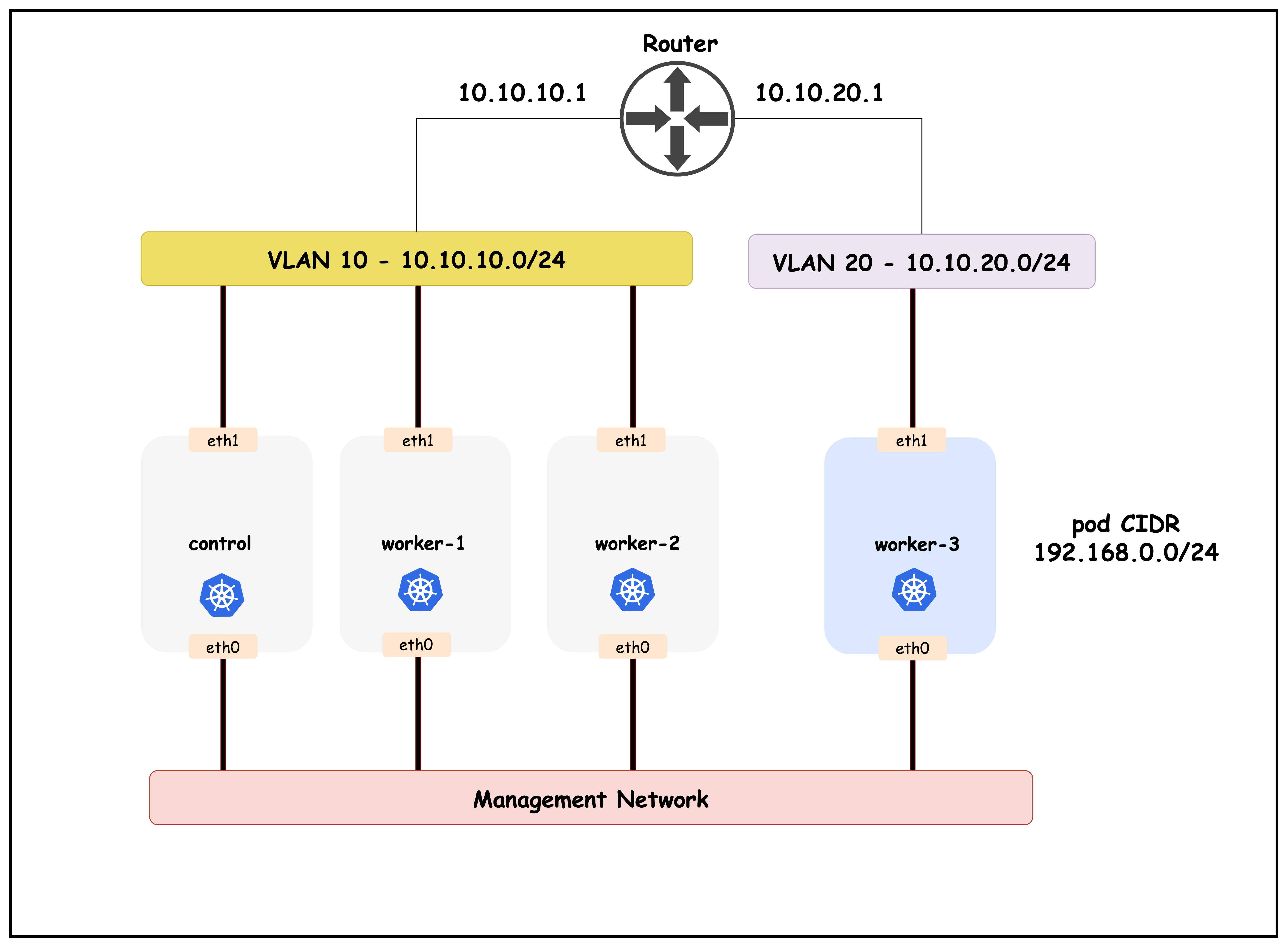
The topology diagram for this cluster setup is as follows:
3.1 Verify the bgpconfiguration Resource
The BGP configuration resource can be found in calico-cni-config/bgpconfiguration-lb.yaml.
kubectl get bgpconfiguration default -o yaml
apiVersion: crd.projectcalico.org/v1
kind: BGPConfiguration
metadata:
  name: default
spec:
  logSeverityScreen: Info
  asNumber: 65010
  nodeToNodeMeshEnabled: false
  serviceLoadBalancerIPs:
  - cidr: 172.16.0.240/28
  prefixAdvertisements:
  - cidr: 192.168.0.0/17
    communities:
    - 65010:100
This BGP configuration defines how Calico handles Border Gateway Protocol routing.
asNumber:65010- The Autonomous System Number assigned to this Calico deployment for BGP peeringnodeToNodeMeshEnabled:false- Disables the full mesh BGP peering between all nodes (requires explicit BGP peer configuration)serviceLoadBalancerIPs: Defines IP ranges for LoadBalancer services that should be advertisedcidr: 172.16.0.240/28- A /28 subnet providing 16 IP addresses for LoadBalancer services
The prefixAdvertisements section controls which network prefixes are advertised via BGP to external peers:
cidr:192.168.0.0/17- The network prefix to be advertised (a /17 subnet containing 32,768 IP addresses from 192.168.0.0 to 192.168.127.255)communities:65010:100- BGP community tag attached to the advertised prefix- Communities are used for route filtering and policy decisions at BGP peers
- Format is
AS:valuewhere AS matches the asNumber (65010) - Can be used by upstream routers to apply specific routing policies to these prefixes
- Enables granular control over route propagation and traffic engineering
3.2 Verify BGP Peers
The BGP peer resources are used to create BGP peerings from the Kubernetes cluster to the upstream network. Let's verify the BGP peers for this lab.
The BGP peer resources are used to create BGP peerings from the Kubernetes cluster to the upstream network. Let's verify the BGP peers for this lab.
- BGP peers for control, worker1 and worker2 which are in subnet or VLAN 10
- BGP peer for worker3 which is in VLAN 20
The reason that there are two BGP peers is because the top of rack switch or the BGP peer IP is different for the two VLANs that we have in this topology.
kubectl get bgppeers
NAME              CREATED AT
bgppeer-vlan-10    2025-11-28T15:58:00Z
bgppeer-vlan-20    2025-11-28T15:58:00Z
Now let's inspect the detailed configuration for each BGP peer:
kubectl get bgppeer bgppeer-vlan-10 -o yaml
apiVersion: crd.projectcalico.org/v1
kind: BGPPeer
metadata:
  name: bgppeer-vlan-10
spec:
  peerIP: 10.10.10.1           # IP address of your Arista switch
  asNumber: 65010             # AS number of the Arista switch
  nodeSelector: vlan == '10'
peerIP:10.10.10.1- The IP address of the BGP peer (router/switch in VLAN 10)asNumber:65010- The Autonomous System Number of the peer (iBGP peering since it matches local AS)nodeSelector:vlan == '10'- Applies this BGP peering only to nodes with the labelvlan=10(control-plane, worker, worker2)
kubectl get bgppeer bgppeer-vlan-20 -o yaml
apiVersion: crd.projectcalico.org/v1
kind: BGPPeer
metadata:
  name: bgppeer-vlan20
spec:
  peerIP: 10.10.20.1
  asNumber: 65010
  nodeSelector: vlan == '20'
peerIP:10.10.20.1- The IP address of the BGP peer (router/switch in VLAN 20)asNumber:65010- The Autonomous System Number of the peer (iBGP peering)nodeSelector:vlan == '20'- Applies this BGP peering only to nodes with the labelvlan=20(worker3)
3.3 Verify BGP configuration in the ToR
The BGP configuration on the Arista cEOS router can be found in the startup configuration file: ceos01-startup-config.config
docker exec -it clab-calico-bgp-lb-ceos01 Cli
enable
show running-config | s bgp
router bgp 65010
  router-id 10.10.10.1
  bgp listen range 10.10.10.0/24 peer-group CALICO-K8S remote-as 65010
  bgp listen range 10.10.20.0/24 peer-group CALICO-K8S remote-as 65010
  neighbor CALICO-K8S peer group
  neighbor CALICO-K8S next-hop-self
  neighbor CALICO-K8S description "Calico Kubernetes Nodes"
  neighbor CALICO-K8S route-reflector-client
  !
  address-family ipv4
    neighbor CALICO-K8S activate
    network 10.10.10.0/24
    network 10.10.20.0/24
This BGP router configuration on the Arista cEOS device establishes it as a BGP route reflector for the Calico cluster:
router bgp 65010- Configures BGP with AS number 65010 (matching the Calico ASN)router-id 10.10.10.1- Sets the BGP router IDbgp listen range- Dynamically accepts BGP connections from:10.10.10.0/24- Control plane subnet10.10.20.0/24- Worker nodes subnet
neighbor CALICO-K8S peer group- Defines a peer group for Calico nodesnext-hop-self- Router advertises itself as next-hop for reflected routesroute-reflector-client- Marks peers as route reflector clients (avoids full mesh requirement)address-family ipv4- Activates IPv4 BGP for the peer group and advertises node subnets
3.4 Verify BGP Status in the ToR
This section demonstrates how to verify that BGP sessions between the Calico nodes and the ToR (Top of Rack) router are established and working correctly. Using CLI commands on the cEOS router (ToR), you'll confirm that all Kubernetes nodes are peered via BGP, and that the expected routing information is being exchanged. This validation step ensures that pod IPs from the Calico IPPools are being advertised to the external network as intended.
Let's first look at the established BGB peers in the ToR.
show ip bgp summary
ceos#show ip bgp summary
BGP summary information for VRF default
Router identifier 10.10.10.1, local AS number 65010
Neighbor Status Codes: m - Under maintenance
  Description              Neighbor    V AS           MsgRcvd   MsgSent  InQ OutQ  Up/Down State   PfxRcd PfxAcc
  "Calico Kubernetes Nodes 10.10.10.10 4 65010             15        14    0    0 00:05:20 Estab   2      2
  "Calico Kubernetes Nodes 10.10.10.11 4 65010             16        13    0    0 00:05:20 Estab   2      2
  "Calico Kubernetes Nodes 10.10.10.12 4 65010             16        13    0    0 00:05:20 Estab   2      2
  "Calico Kubernetes Nodes 10.10.20.20 4 65010             15        13    0    0 00:05:20 Estab   2      2
The BGP summary shows four established peering sessions with Calico nodes:
10.10.10.10- k01-control-plane (VLAN 10)10.10.10.11- k01-worker (VLAN 10)10.10.10.12- k01-worker2 (VLAN 10)10.10.20.20- k01-worker3 (VLAN 20)
Each peer has received 2 prefixes (PfxRcd) from the route reflector clients.
Rendering diagram…
Next, let's look at the routing table of the ToR.
show ip route
ceos#show ip route

VRF: default
## truncated response.

Gateway of last resort is not set

 C        10.10.10.0/24
       directly connected, Vlan10
 C        10.10.20.0/24
       directly connected, Vlan20
 B I      172.16.0.240/28 [200/0]
       via 10.10.10.10, Vlan10
 C        172.20.20.0/24
       directly connected, Management0
 B I      192.168.42.192/26 [200/0]
       via 10.10.10.11, Vlan10
 B I      192.168.46.128/26 [200/0]
       via 10.10.20.20, Vlan20
 B I      192.168.69.0/26 [200/0]
       via 10.10.10.10, Vlan10
 B I      192.168.88.192/26 [200/0]
       via 10.10.10.12, Vlan10
The routing table shows that the ToR has learned the following pod routes via BGP:
192.168.42.192/26- Pod CIDR block for k01-worker (10.10.10.11)192.168.46.128/26- Pod CIDR block for k01-worker3 (10.10.20.20)192.168.69.0/26- Pod CIDR block for k01-control-plane (10.10.10.10)192.168.88.192/26- Pod CIDR block for k01-worker2 (10.10.10.12)
The correlation between BGP routes and IPAM block affinities:
k01-control-plane-192-168-69-0-26   2025-11-28T23:32:10Z
k01-worker-192-168-42-192-26        2025-11-28T23:32:11Z
k01-worker2-192-168-88-192-26       2025-11-28T23:32:07Z
k01-worker3-192-168-46-128-26       2025-11-28T23:32:11Z
Rendering diagram…
Each Kubernetes node advertises its allocated IPAM block to the ToR router via BGP, making pod IPs routable from the external network.
3.5 Verify BGP Status for a Node
Apply the following manifest
kubectl apply -f -<<EOF
apiVersion: projectcalico.org/v3
kind: CalicoNodeStatus
metadata:
  name: k01-control-plane
spec:
  classes:
    - Agent
    - BGP
    - Routes
  node: k01-control-plane
  updatePeriodSeconds: 10
EOF
kubectl get caliconodestatus k01-control-plane -o json | jq '.status.routes.routesV4[] | select(.learnedFrom.sourceType == "BGPPeer" and .type == "FIB")'
{
  "destination": "192.168.88.192/26",
  "gateway": "10.10.10.1",
  "interface": "eth1",
  "learnedFrom": {
    "peerIP": "10.10.10.1",
    "sourceType": "BGPPeer"
  },
  "type": "FIB"
}
{
  "destination": "192.168.42.192/26",
  "gateway": "10.10.10.1",
  "interface": "eth1",
  "learnedFrom": {
    "peerIP": "10.10.10.1",
    "sourceType": "BGPPeer"
  },
  "type": "FIB"
}
{
  "destination": "192.168.46.128/26",
  "gateway": "10.10.10.1",
  "interface": "eth1",
  "learnedFrom": {
    "peerIP": "10.10.10.1",
    "sourceType": "BGPPeer"
  },
  "type": "FIB"
The output above shows the IPv4 routes that the Calico node k01-control-plane has learned via BGP from the peer at 10.10.10.1 (the ToR router). Each object details a route including the destination prefix (e.g., 192.168.88.192/26), the gateway IP, and the interface used to reach the gateway. The learnedFrom.sourceType is "BGPPeer", indicating these routes were received via a BGP peering session, and type is "FIB", meaning these routes are programmed into the node's Forwarding Information Base (FIB) and are being used for actual packet forwarding.
This output confirms that the node is successfully receiving external routes, and that BGP-based pod network advertisement is functioning as expected.
You can also confirm this by looking at the nodes routing table.
First, exec into the control plane node.
docker exec -it k01-control-plane /bin/bash
Next, let's grep for routes learned through BGP.
root@k01-control-plane:/# ip route | grep bird
192.168.42.192/26 via 10.10.10.1 dev eth1 proto bird
192.168.46.128/26 via 10.10.10.1 dev eth1 proto bird
blackhole 192.168.69.0/26 proto bird
192.168.88.192/26 via 10.10.10.1 dev eth1 proto bird
4. Testing Connectivity
Next, let's perform some connectivity testing. First retrieve the IP address of the multitool-1 pod in k01-worker3.
kubectl get pod -o json --field-selector spec.nodeName=k01-worker3 | jq -r '.items[] | select(.metadata.name | test("multitool-1")) | .status.podIP'
192.168.46.129
Let's also retrieve the IP address of the multitool-1 pod in k01-worker
kubectl get pod -o json --field-selector spec.nodeName=k01-worker | jq -r '.items[] | select(.metadata.name | test("multitool-1")) | .status.podIP'
192.168.42.193
Next, let's exec into the multitool-1 pod in node k01-worker
kubectl exec -it $(kubectl get pods -o wide --field-selector spec.nodeName=k01-worker | awk '/multitool-1/ {print $1}') -- /bin/sh

ping 192.168.46.129
PING 192.168.46.129 (192.168.46.129) 56(84) bytes of data.
64 bytes from 192.168.46.129: icmp_seq=1 ttl=61 time=1.97 ms
64 bytes from 192.168.46.129: icmp_seq=2 ttl=61 time=1.49 ms
64 bytes from 192.168.46.129: icmp_seq=3 ttl=61 time=1.56 ms
64 bytes from 192.168.46.129: icmp_seq=4 ttl=61 time=1.42 ms
64 bytes from 192.168.46.129: icmp_seq=5 ttl=61 time=1.56 ms
64 bytes from 192.168.46.129: icmp_seq=6 ttl=61 time=1.52 ms
64 bytes from 192.168.46.129: icmp_seq=7 ttl=61 time=1.77 ms
64 bytes from 192.168.46.129: icmp_seq=8 ttl=61 time=1.79 ms
The output above demonstrates successful connectivity between two pods (multitool-1) running on separate Kubernetes nodes (k01-worker and k01-worker3), each located in different subnets. The first command retrieves the pod IP address on k01-worker3, and the second command execs into the pod on k01-worker to ping that IP.
The successful ping replies confirm that Calico's BGP configuration is correctly advertising pod network routes between subnets. Each node's pod CIDR block is announced to the upstream router (ToR) via BGP, and the ToR redistributes these routes back to all nodes. As a result, packets between pods in different subnets are routed efficiently, without NAT or overlay tunneling, using native IP routing. This validates that cross-subnet pod-to-pod connectivity is working as intended in the lab setup.
Rendering diagram…
4.1 Packet Flow: Life of a Ping
The following diagram illustrates the step-by-step journey of an ICMP packet from the source pod on k01-worker (VLAN 10) to the destination pod on k01-worker3 (VLAN 20):
Rendering diagram…
Key observations:
No overlay/encapsulation: Packets are routed using native IP routing, not tunneledBGP-learned routes: Each node learns routes to other pod CIDRs via the ToR route reflectorToR as transit: The ToR router forwards traffic between VLANs using BGP-learned routesTTL=61: The ping output shows TTL=61, indicating 3 hops (64-3=61): Worker → ToR → Worker3 → Pod
The diagram above illustrates the cross-subnet pod-to-pod connectivity path. Traffic from the multitool-1 pod on k01-worker (VLAN 10) is routed through the ToR (acting as a BGP route reflector), which forwards it to k01-worker3 (VLAN 20) based on the BGP-learned routes. The reply follows the reverse path, demonstrating successful native IP routing without overlay encapsulation.
Next, let's exec into the ToR and ping the two multitool-1 pod IPs
docker exec -it clab-calico-bgp-lb-ceos01 Cli
ping 192.168.42.193
ceos>ping 192.168.42.193
PING 192.168.42.193 (192.168.42.193) 72(100) bytes of data.
80 bytes from 192.168.42.193: icmp_seq=1 ttl=63 time=4.02 ms
80 bytes from 192.168.42.193: icmp_seq=2 ttl=63 time=3.24 ms
80 bytes from 192.168.42.193: icmp_seq=3 ttl=63 time=0.711 ms
80 bytes from 192.168.42.193: icmp_seq=4 ttl=63 time=0.827 ms
80 bytes from 192.168.42.193: icmp_seq=5 ttl=63 time=0.784 ms

--- 192.168.42.193 ping statistics ---
5 packets transmitted, 5 received, 0% packet loss, time 15ms
rtt min/avg/max/mdev = 0.711/1.917/4.020/1.421 ms, ipg/ewma 3.783/2.884 ms
ping 192.168.46.129
PING 192.168.46.129 (192.168.46.129) 72(100) bytes of data.
80 bytes from 192.168.46.129: icmp_seq=1 ttl=63 time=1.06 ms
80 bytes from 192.168.46.129: icmp_seq=2 ttl=63 time=0.629 ms
80 bytes from 192.168.46.129: icmp_seq=3 ttl=63 time=0.480 ms
80 bytes from 192.168.46.129: icmp_seq=4 ttl=63 time=0.534 ms
80 bytes from 192.168.46.129: icmp_seq=5 ttl=63 time=0.859 ms

--- 192.168.46.129 ping statistics ---
5 packets transmitted, 5 received, 0% packet loss, time 4ms
rtt min/avg/max/mdev = 0.480/0.713/1.064/0.218 ms, ipg/ewma 1.034/0.888 ms
The outputs above confirm that the pod IPs are now reachable by the external network as well.
Summary
Here's a quick recap of what you just accomplished in this lab:
- You just advertised your Calico pod CIDRs via BGP through the ToR route reflector, so your pods are reachable without overlays or NAT.
- You walked through the IPPool, IPAM, BGPConfiguration, and BGPPeer resources to confirm they match the topology you built.
- You proved the BGP sessions and learned routes on both the nodes and the ToR, so pods can talk across subnets and from outside the cluster.
Lab Cleanup
to cleanup the lab follow steps in Lab cleanup