Kubernetes Services - ClusterIP
Services provide a stable virtual IP and DNS name in front of pods. They decouple clients from pod lifecycles and provide simple L4 load balancing inside the cluster.
Overview
- Pods are ephemeral: IPs change; clients need a stable endpoint.
- Load balancing: distribute traffic across replicas automatically.
- Service discovery: use DNS names instead of pod IPs.
- Controlled exposure: keep internal-only or expose externally as needed.
The type of services
- ClusterIP: internal-only virtual IP for in-cluster access.
- NodePort: opens a port on every node (30000–32767).
- LoadBalancer: provisions an external LB (cloud/MetalLB).
- ExternalName: DNS CNAME to an external hostname; no proxying.
- Headless (
clusterIP: None): no VIP; DNS returns pod IPs.
ClusterIP Service
Kubernetes Services of type ClusterIP provide an in-cluster virtual IP (VIP). kube-proxy on each node programs data-plane rules (iptables, IPVS, or userspace modes) to steer traffic sent to the Service VIP toward matching backend Pods.
How kube-proxy Programs a ClusterIP Service
High-level flow and components:
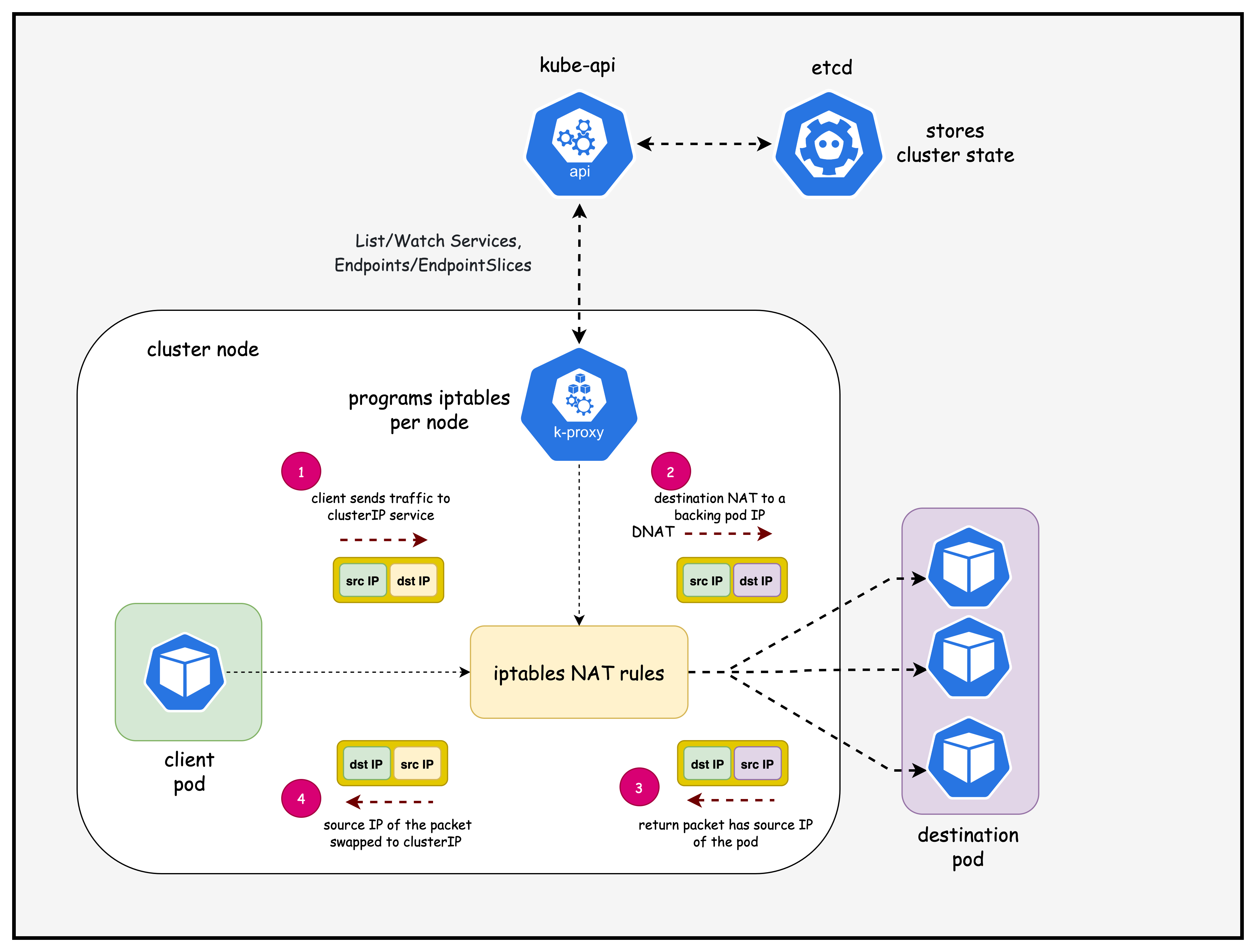
Key steps when you create/update a ClusterIP Service:
- API event: You
kubectl applya Service; the apiserver stores it inetcdand updatesEndpointSliceobjects based on label selectors matching Pods. - kube-proxy watch: Each node's kube-proxy maintains watches on Services and EndpointSlices; it gets incremental updates.
- Program dataplane: kube-proxy translates the desired state into local dataplane rules:
- iptables mode: Installs chains/rules that DNAT traffic destined to the Service VIP to one of the backend Pod IP:Port, with per-connection affinity and probability.
- IPVS mode: Programs an in-kernel virtual server for the Service VIP with backend real servers (Pods), offering better scale and metrics.
- Traffic path: Any Pod on any node sending traffic to the Service ClusterIP hits local kube-proxy rules on its node, then gets load-balanced to a healthy backend Pod (local or remote). Return traffic follows normal routing (no SNAT needed in-cluster).
Lab Setup
To setup the lab for this module Lab setup
The lab folder is - /containerlab/04-k8s-services
Manifest Files
ContainerLab
| File | Description |
|---|---|
| k8-services.clab.yaml | ContainerLab topology defining the Kind cluster |
Kind Cluster
| File | Description |
|---|---|
| k8-services-no-cni.yaml | Kind cluster configuration without CNI |
Calico CNI
| File | Description |
|---|---|
| calico-cni-config/custom-resources.yaml | Custom Calico Installation resource with IPAM configuration |
Tools
| File | Description |
|---|---|
| tools/nginx-deployment.yaml | Nginx deployment with ClusterIP service |
Deployment
- ContainerLab Topology Deployment: Creates a 3-node Kind cluster using the
k8-services.clab.yamlconfiguration - Kubeconfig Setup: Exports the Kind cluster's kubeconfig for kubectl access
- Calico Installation: Downloads and installs calicoctl, then deploys Calico CNI components:
- Calico Operator CRDs
- Tigera Operator
- Custom Calico resources with IPAM configuration
- Test Pod Deployment: Deploys two multitool DaemonSets for connectivity testing and an nginx deployment with a cluster-ip service for testing pod to service connectivity
- Verification: Waits for all Calico components to become available before completion
Deploy the lab using:
cd containerlab/k8s-services
chmod +x deploy.sh
./deploy.sh
Lab Exercises
After deployment, verify the cluster is ready by checking the ContainerLab topology status:
1. Inspect ContainerLab Topology
containerlab inspect -t k8s-services.clab.yaml
2. Verify pods and services in the default namespace
# Set kubeconfig to use the cluster
export KUBECONFIG=/home/ubuntu/containerlab/4-k8s-services/k8-services.kubeconfig

# Check cluster nodes
kubectl get pods -o wide
Output:
NAME                                READY   STATUS    RESTARTS   AGE   IP                NODE                        NOMINATED NODE   READINESS GATES
multitool-1-bgssq                   1/1     Running   0          8h    192.168.202.194   k8-services-worker          <none>           <none>
multitool-1-n5s2c                   1/1     Running   0          8h    192.168.145.9     k8-services-control-plane   <none>           <none>
multitool-1-vfr5n                   1/1     Running   0          8h    192.168.156.3     k8-services-worker2         <none>           <none>
multitool-2-cbbzt                   1/1     Running   0          8h    192.168.202.195   k8-services-worker          <none>           <none>
multitool-2-l8zhv                   1/1     Running   0          8h    192.168.145.10    k8-services-control-plane   <none>           <none>
multitool-2-skzmp                   1/1     Running   0          8h    192.168.156.4     k8-services-worker2         <none>           <none>
nginx-deployment-55d7bb4b86-vg4lt   1/1     Running   0          8h    192.168.156.5     k8-services-worker2         <none>           <none>
nginx-deployment-55d7bb4b86-xqh9d   1/1     Running   0          8h    192.168.202.196   k8-services-worker          <none>           <none>
- Pods are healthy ✅ and spread across nodes; this confirms scheduling and readiness across the control plane and workers.
- The Pod IP column shows routable pod CIDR addresses you'll later see in EndpointSlices; capture them as expected backends.
kubectl get services -n default | grep nginx-service
Output:
nginx-service ClusterIP 10.96.204.67 <none> 80/TCP 8h
- Service VIP 🎯 is
10.96.204.67:80; this is the stable in-cluster address clients use instead of pod IPs. - Type is ClusterIP, so it's only reachable inside the cluster namespace via VIP or DNS (e.g.,
nginx-service).
kubectl get endpointslice | grep nginx-service
Output:
nginx-service-6zrf8 IPv4 80 192.168.156.5,192.168.202.196 8h
- EndpointSlice 🔗 lists backend Pod IPs that the Service will load-balance to; these should match the nginx pod IPs above.
- This confirms kube-controller-manager populated endpoints and kube-proxy can program data-plane rules for this Service.
3. Test pod to service connectivity
Exec into the first multitool-1 pod scheduled in the worker node
kubectl exec -it multitool-1-bgssq -- sh
- Opens a shell 🧰 inside the worker-scheduled test pod, letting you run network tools from an application-like vantage point.
telnet nginx-service 80
- Connects via Service DNS to port 80; a successful TCP handshake 🔌 proves name resolution and Service VIP routing are functional.
Output:
Connected to nginx-service
- Connection established ✅ through kube-proxy to one of the nginx pods; this validates dataplane rules (iptables/IPVS) on the local node.
get
- Sends a minimal HTTP request; although incomplete, it should elicit an HTTP response which is enough to validate L4→L7 reachability.
Output:
HTTP/1.1 400 Bad Request
Server: nginx/1.28.0
Date: Sun, 07 Sep 2025 04:33:42 GMT
Content-Type: text/html
Content-Length: 157
Connection: close

<html>
<head><title>400 Bad Request</title></head>
<body>
<center><h1>400 Bad Request</h1></center>
<hr><center>nginx/1.28.0</center>
</body>
</html>
Connection closed by foreign host
- 400 Bad Request 📬 is expected for an incomplete HTTP request; it proves the request hit nginx and traversed the Service path end-to-end.
4. Examine iptables rules (ClusterIP path)
docker exec -it k8-services-worker /bin/bash
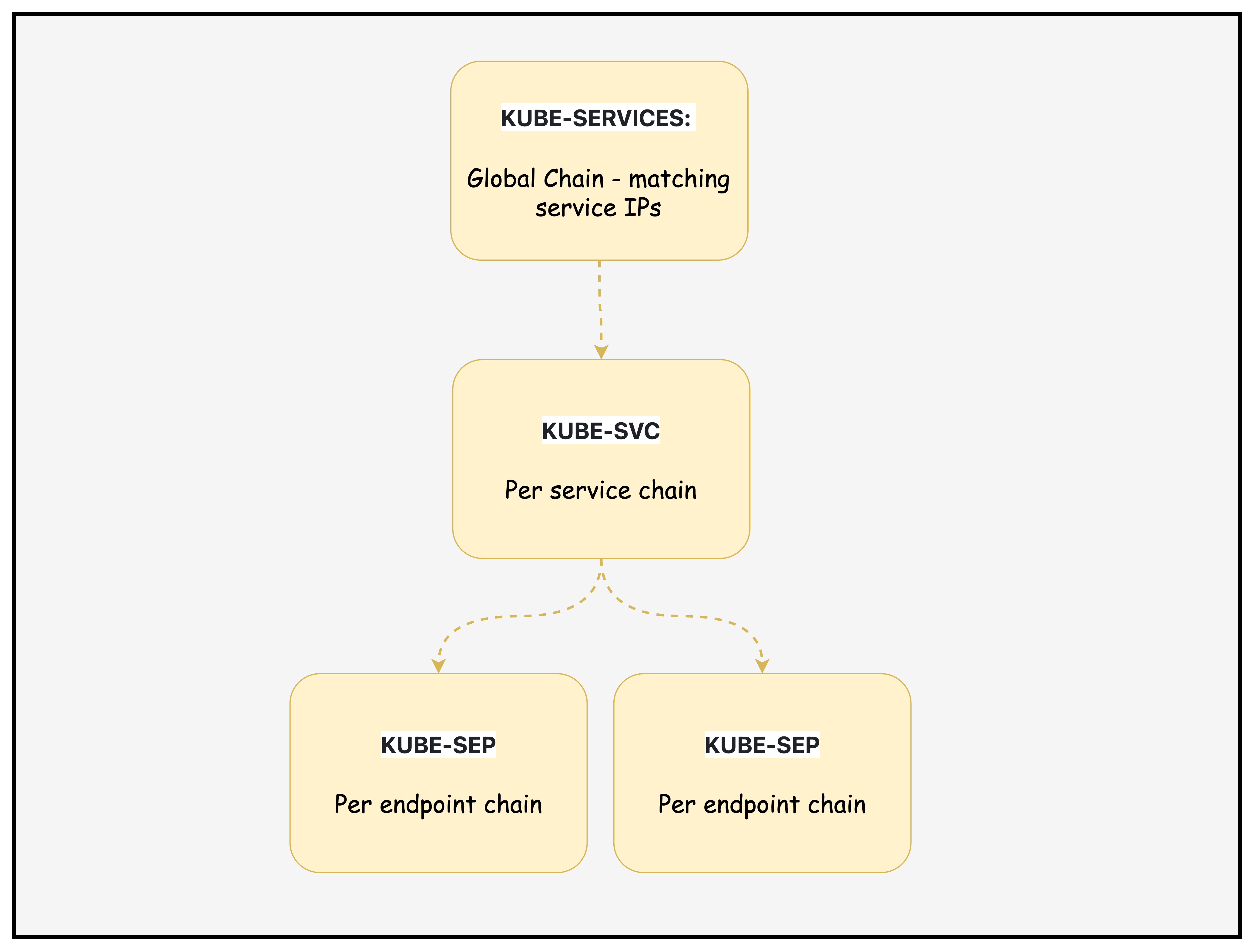
Traffic to a Service IP first hits KUBE-SERVICES, gets directed to a KUBE-SVC chain for load balancing, then lands in one of the KUBE-SEP endpoint chains where DNAT maps it to the actual Pod. This is how kube-proxy abstracts multiple Pods behind a single stable Service IP
4.1 Locate Service Rule 🔎
iptables -t nat -S KUBE-SERVICES | grep nginx-service
Output:
-A KUBE-SERVICES -d 10.96.204.67/32 -p tcp -m comment --comment "default/nginx-service:http cluster IP" -m tcp --dport 80 -j KUBE-SVC-6IM33IEVEEV7U3GP
- What it shows
- Matches TCP traffic to the Service VIP
10.96.204.67:80and jumps to the per-service chainKUBE-SVC-6IM33IEVEEV7U3GP.
- Matches TCP traffic to the Service VIP
- Flags
-t nat: NAT table.-S: show rules in append syntax.-d <ip>/32: exact destination IP.-p tcp+--dport 80: TCP 80.-m comment --comment: human-readable note.-j: jump target.
4.2 Inspect Service Chain ⚙️
iptables -t nat -L KUBE-SVC-6IM33IEVEEV7U3GP -n -v --line-numbers
Output:
Chain KUBE-SVC-6IM33IEVEEV7U3GP (1 references)
num   pkts bytes target            prot opt in  out source        destination
1        0     0 KUBE-MARK-MASQ   tcp  --  *    *   !192.168.0.0/16 10.96.204.67 /* default/nginx-service:http cluster IP */ tcp dpt:80
2        0     0 KUBE-SEP-M6MI3YLHVX7DA53R  all  --  *    *   0.0.0.0/0     0.0.0.0/0 /* default/nginx-service:http -> 192.168.156.5:80 */ statistic mode random probability 0.50000000000
3        0     0 KUBE-SEP-MJ46KNWYZBDUIDMY  all  --  *    *   0.0.0.0/0     0.0.0.0/0 /* default/nginx-service:http -> 192.168.202.196:80 */
- What it shows
- Rule 1: mark for masquerade if client is outside
192.168.0.0/16. - Rules 2–3: load-balance to endpoint chains; first with 50% probability, second catches remainder.
- Rule 1: mark for masquerade if client is outside
- Flags
-L: list rules.-n: no name resolution.-v: counters.--line-numbers: indices.!CIDR: negation match.statistic mode random: probabilistic branching.
4.3 Examine Endpoint DNAT #1 🎯
iptables -t nat -L KUBE-SEP-M6MI3YLHVX7DA53R -n -v --line-numbers
Output:
Chain KUBE-SEP-M6MI3YLHVX7DA53R (1 references)
num   pkts bytes target           prot opt in out source          destination
1        0     0 KUBE-MARK-MASQ  all  --  *   *   192.168.156.5   0.0.0.0/0 /* default/nginx-service:http */
2        0     0 DNAT            tcp  --  *   *   0.0.0.0/0       0.0.0.0/0 /* default/nginx-service:http */ tcp to:192.168.156.5:80
- What it shows
- Packets routed here are DNATed to Pod
192.168.156.5:80; the mark supports egress SNAT/masquerade if needed.
- Packets routed here are DNATed to Pod
- Flag highlight
DNAT ... to:<podIP>:<port>: destination NAT to backend Pod.
4.4 Examine Endpoint DNAT #2 🎯
iptables -t nat -L KUBE-SEP-MJ46KNWYZBDUIDMY -n -v --line-numbers
Output:
Chain KUBE-SEP-MJ46KNWYZBDUIDMY (1 references)
num   pkts bytes target           prot opt in out source           destination
1        0     0 KUBE-MARK-MASQ  all  --  *   *   192.168.202.196  0.0.0.0/0 /* default/nginx-service:http */
2        0     0 DNAT            tcp  --  *   *   0.0.0.0/0        0.0.0.0/0 /* default/nginx-service:http */ tcp to:192.168.202.196:80
- What it shows
- Alternate backend Pod
192.168.202.196:80; together with the prior endpoint, these are the two backends behind the Service.
- Alternate backend Pod
4.5 Traffic Flow 🧭
KUBE-SERVICESmatches Service VIP → jumps toKUBE-SVC-6IM33IEVEEV7U3GP.KUBE-SVC-…optionally marks for MASQ and probabilistically selects an endpoint.KUBE-SEP-…DNATs to the Pod IP:Port; return traffic may be SNATed per kube-proxy postrouting rules.
4.6 Diagram: Chains and Flow 🧩
Context: ClusterIP Service nginx-service → VIP 10.96.204.67:80
Endpoints: 192.168.156.5:80 and 192.168.202.196:80
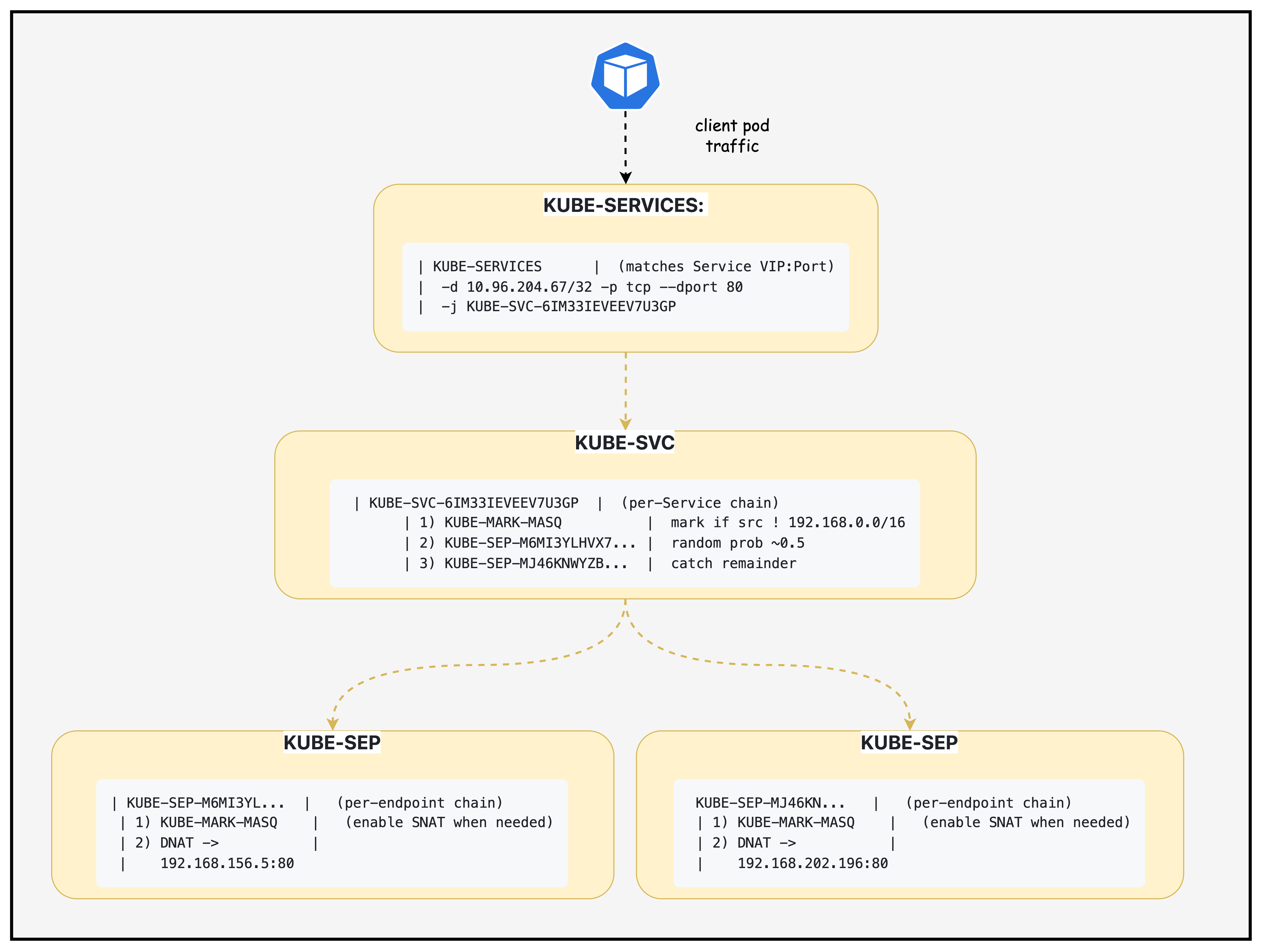
Legend
- KUBE-SERVICES: Global chain matching Service VIPs; jumps to per‑service.
- KUBE-SVC-<hash>: Per‑service chain; applies MASQ marks and load-balances.
- KUBE-SEP-<hash>: Per‑endpoint chain; DNATs to Pod IP:Port; may mark for MASQ.
- MASQ/SNAT: Ensures reply traffic returns correctly in certain topologies.
Summary
This lab demonstrates how Kubernetes ClusterIP Services work under the hood, focusing on the kube-proxy implementation that translates Service virtual IPs into actual network traffic routing. You'll deploy a 3-node Kind cluster with Calico CNI, create test workloads (nginx deployment with ClusterIP service and multitool pods), and then deep-dive into the iptables rules that kube-proxy programs to enable service discovery and load balancing.
Additional Notes
Notes and nuances:
- EndpointSlices: kube-proxy prefers EndpointSlices over legacy Endpoints for scalability; both represent the set of Pod IPs and ports selected by the Service.
- Session affinity:
sessionAffinity: ClientIPmakes kube-proxy pin a client IP to the same backend for a configurable timeout. - Health checks: kube-proxy doesn't probe Pods; it trusts the Endpoints/EndpointSlices populated by the control plane and readiness gates from kubelet.
- Node-local optimization: With
externalTrafficPolicy: Local(for NodePort/LB) traffic may prefer local backends; for ClusterIP, kube-proxy can still choose local Pod IPs when available. - Dual-stack: For dual-stack clusters, Services can have both IPv4/IPv6 VIPs; kube-proxy programs rules for each family.
Lab Cleanup
to cleanup the lab follow steps in Lab cleanup